

 日本語
日本語
This is the third article in a series examining three business-improvement projects I completed with AI.
The first covered the recovery of an e-commerce site that had been taken offline by abnormal bot traffic. The second looked at the complete rebuild of a WordPress-based B2B ordering site using Next.js and Supabase.
This third article follows the development of a Chrome extension that makes it easy to check Claude usage directly from the browser, as well as the process of publishing it on the Chrome Web Store.
While the first two projects involved an e-commerce site and a business system, this one began with a much smaller, everyday inconvenience. That makes it a useful example of where practical AI adoption can begin.
The Starting Point: A Small but Recurring Inconvenience
In spring 2026, I learned that my cousin, who had no previous programming experience, had built two e-commerce sites in a single week and published several apps to an app store. It made me realize that AI-assisted development was no longer limited to experienced programmers. It had already become practical enough for people without a traditional development background to build and release working products.
That experience prompted me to begin using Claude more seriously. I started with the Pro plan, but soon upgraded to the Max plan after seeing ideas I had carried for some time take shape much faster than I had expected. I would normally think carefully before committing to a higher-priced plan, but the practical possibilities were already clear.
At the same time, if I was going to spend $100 a month, I wanted to make effective use of the available capacity. Claude has five-hour session limits as well as weekly usage limits, so I began checking my usage several times a day to plan my work around them.
Checking usage on the web requires opening the usage page from the profile menu each time. The process takes only a few seconds, but when repeated several times every day, it becomes a small but persistent inconvenience.
I decided to remove that friction by building a Chrome extension that would make my Claude usage visible directly from the browser.
Aligning with AI Before Starting the Implementation
The extension had three main requirements:
- Display current usage from an icon in the Chrome toolbar
- Show daily usage and a breakdown by model when the icon is clicked
- Add gamification elements to differentiate it from similar extensions
However, I did not simply hand these requirements to Claude Code and ask it to start building.
As with the B2B ordering-site rebuild discussed in the previous article, I first worked through what should be displayed, how much detail to include, and how the information should be presented. I continued the conversation until I felt that my intent and the AI’s understanding were aligned.
The third requirement—gamification—required the most consideration.
My research showed that several Chrome extensions for displaying Claude usage were already available. Using one of them was certainly an option. However, because I had never developed a Chrome extension before, I decided that going through the entire process myself—from concept and implementation to publication—would be a worthwhile experience.
Simply displaying usage would offer little differentiation. I therefore decided to add scores, streaks, and achievements based on information naturally generated through use, such as whether someone uses Claude consistently and how efficiently they manage their available capacity.
In the future, I may also add the option to collect anonymized usage data with the user’s consent. If enough data were collected, it could support features such as rankings and comparisons of regional usage patterns.
For example, usage might peak late at night in one region but be concentrated in the afternoon in another. Over time, this could offer insight into how Claude usage varies across regions and time zones.
After working through these ideas with Claude, I asked it to turn our discussion into a Markdown specification for Claude Code. Only after the requirements and overall direction were clear did I hand the implementation over to Claude Code.
Making Usage Visible from the Toolbar and Dashboard
The completed extension displays current usage as a badge in the Chrome toolbar. Clicking the icon opens a detailed view showing current usage, remaining capacity, and reset times.
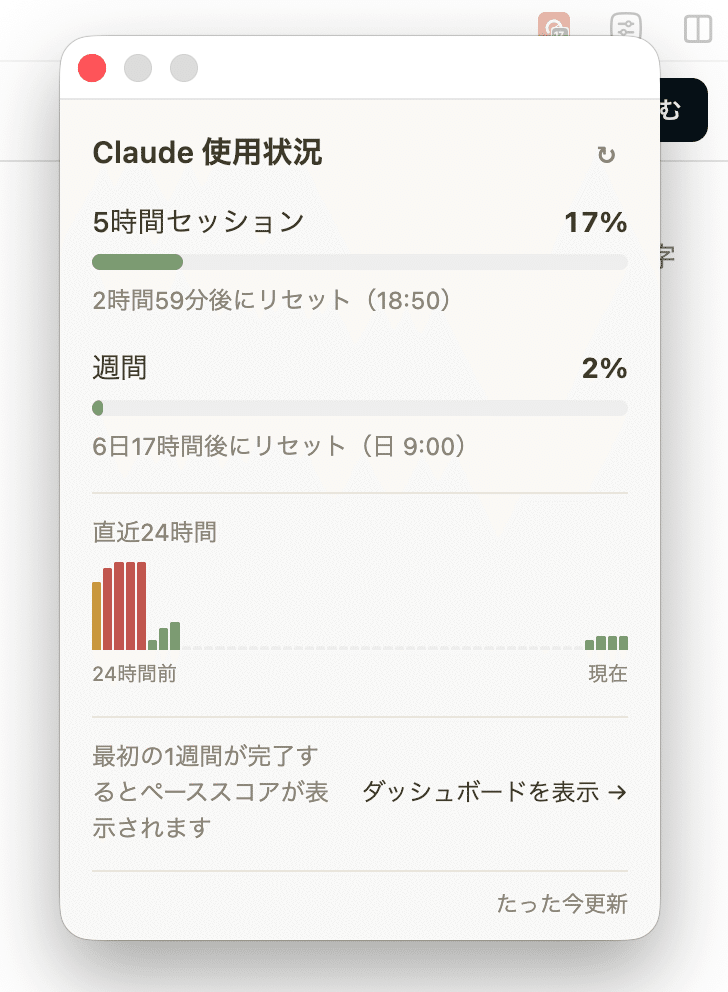
The dashboard also shows daily usage, a breakdown by model, and gamification features such as scores and streaks.
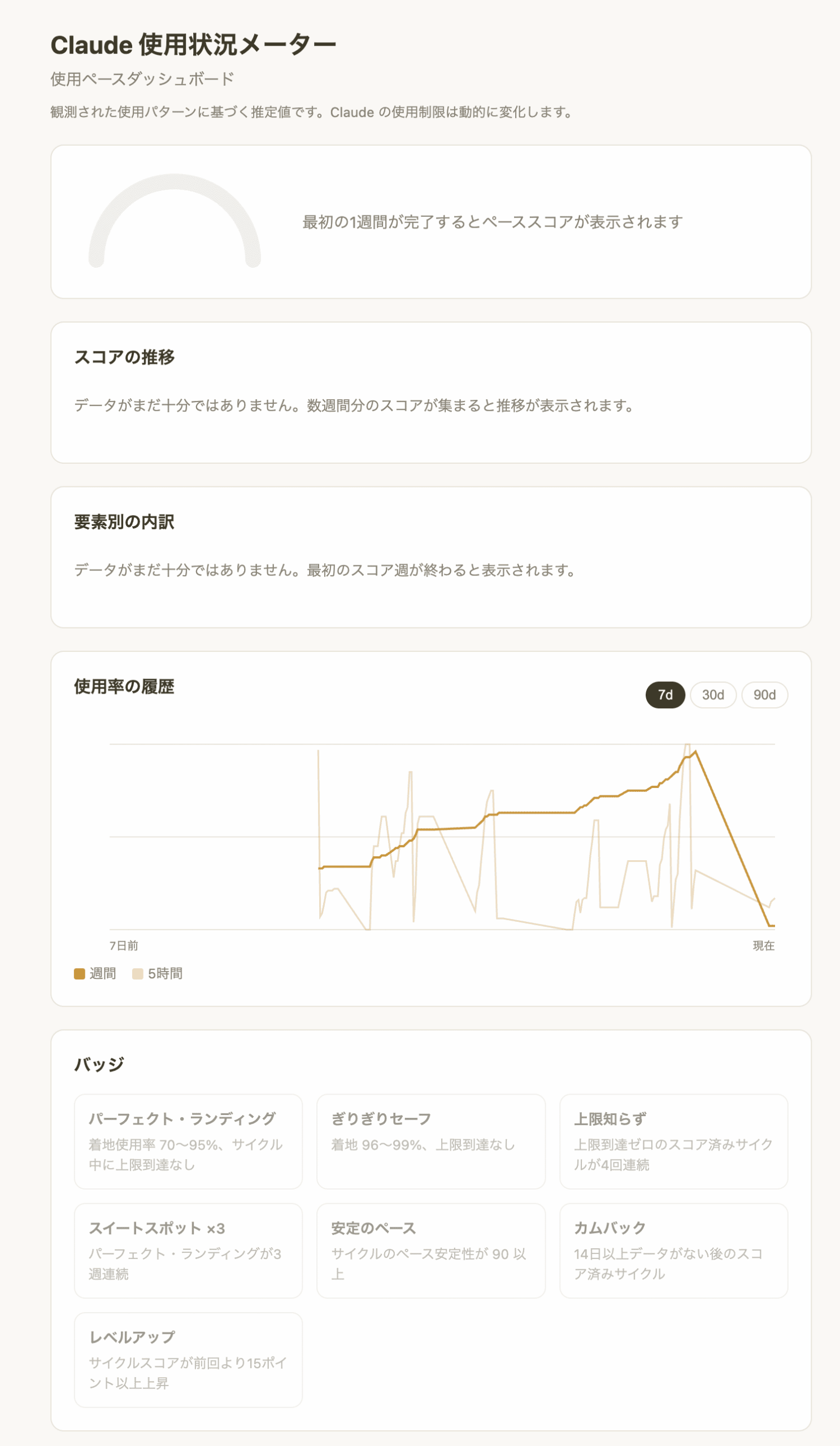
Some scores are not yet available because the extension has not accumulated enough usage data. However, the core functionality envisioned during the design stage is now in place.
The option to store anonymized data on a server may be added after observing how the extension performs in actual use.
The result is simple: information that previously required navigating through several screens is now available with one click. It may appear to be a minor improvement, but for an action repeated several times a day, the practical effect is meaningful.
Using AI to Navigate the Publication Process
This was my first time developing a Chrome extension, and it was also my first time publishing one on the Chrome Web Store. Since the implementation was already complete, I decided not to keep it as a personal tool but to take it through the full publication process.
Publishing an extension involves developer registration, preparing listing images and descriptions, completing privacy disclosures, and submitting the extension for review. Many of these steps were unfamiliar, so I again worked through them one at a time with Claude.
One particularly useful approach was to send Claude a screenshot whenever I encountered a screen or setting I did not understand. Claude reviewed what was displayed and explained what to enter in each field and which button to click next.
This experience reinforced that AI’s role is not limited to generating code. It can support the entire process, from defining requirements before development to navigating the publication process afterward. That kind of step-by-step guidance is especially valuable when working alone in an unfamiliar area.
Creating a Dedicated Site for Apps and Business Tools
Beyond this extension, I had wanted to create a single place where we could share the apps and business tools we had built with AI. I therefore worked with Claude to create a dedicated site called Magnote Apps.
The Claude usage extension is the first tool published there. In the future, we plan to add other tools originally built for our own operations, including integrations between e-commerce and accounting systems and tools that automate Slack notifications.
Each of these tools began with a problem we encountered in our own work—something repetitive, inefficient, or simply tedious. The same tools may also be useful to other businesses and individuals facing similar challenges.
Magnote Apps provides a place to test that possibility by making these internally developed tools available to a wider audience.
AI Adoption Starts with the Problem in Front of You
Looking back across the three projects—the response to abnormal bot traffic, the rebuild of the B2B ordering site, and the Claude usage extension—each began with a specific inconvenience already present in our day-to-day operations.
None began with an enterprise-wide AI strategy. Instead, we identified something that was taking too much time or creating unnecessary friction and asked what parts of the problem could be handled by AI. The three projects described in this series grew from that repeated process.
That does not mean everything should be delegated to AI. People must still decide what to build, how it should be used, and how much responsibility should be handed over.
Tools are meant to be used—not to use us.
Discussions about AI adoption often focus on enterprise-wide strategies and large-scale system implementations. In practice, meaningful results can also come from addressing the small, recurring problems that people encounter in their everyday work.
For companies considering where to begin with AI, a useful first step may be to examine their existing workflows and ask a simple question:
What repetitive task continues to create unnecessary work?
Shinya Fujimoto is an entrepreneur and engineer with more than 25 years of experience in the United States. Through Silicon Valley Japan Lab, he shares analysis of Silicon Valley technology trends and what they mean for Japanese businesses and organizations.